Yet again, it’s been over a year since I’ve posted. As I don’t have the time to sit down and bang out a lengthy update, I figured I’d simply share some articles I’ve found interesting lately — much like I used to do years ago. These are what I have open in my browser right now:
I missed posting last month because a lot was happening! Of course, for everyone who is involved with technology and data at a global level, we have all been touched in some way by GDPR. I know my inbox was flooded with emails on the changes to everyone’s privacy policies and probably yours was, too. It’s worth a read to learn more about it and why it’s such a big deal and how it’s affecting businesses all over the world.
For me personally, May was a big month because I changed jobs after almost a decade at The Planet/SoftLayer + IBM where I had been a design lead for Infrastructure as a Service (IaaS), IAM (identity and access management), and BSS (accounts) and then head of the Strategic Insights team for Public Cloud Research (covering all of Infrastructure as a Service and Platform as a Service). I moved from there to SAP Leonardo Services where I took the position of a Blockchain Design Consultant. This means I’ve been heads down learning all I can about Blockchain and my new company for the last 3 weeks.
Here’s where I have to have a sense of humor around these two seemingly unrelated subjects considering the paradox of Blockchain and GDPR.
To summarize the article, given the immutable state of data in a Blockchain, there is no way to update or delete it. In developer’s parlance, there is no way to perform the UD operations of basic CRUD. In fact, the entire acronym has been updated for blockchain to be CRAB (create, retrieve, append, burn). The problem is, does burn accommodate the “right to be forgotten” and “erasure of data” portions of GDPR? If personal data is in the Blockchain, then the answer is no.
That said, there is a workaround as discussed via creating a hash and a link in the Blockchain that refers back to PII (personally identifiable information) that is stored OUTSIDE of the Blockchain. This results in the PII data only being accessible through an encrypted hash and link to it provided in the Blockchain that can only be decrypted by those who have the key. To ensure the data hasn’t been tampered with, the data retrieved via the link would need to provide its own hash that can be compared with the hash in the blockchain. If the two match, the data has not been modified. This is GDPR compliant because all of the data off-chain can be deleted thus making the hash/link in the blockchain useless. However, the blockchain is then reduced to an access control mechanism to data that remains centrally owned and located rather than a decentralized encrypted transparent immutable replicated ledger of actual data that is owned by everyone.
This results in the following:
The goal of GPDR is to give citizens back the control of their personal data, whilst imposing strict rules on those hosting and processing this data, anywhere in the world. Also, one of the things GDPR states is that data should be erasable. Since throwing away your encryption keys is not the same as ‘erasure of data, GDPR prohibits us from storing personal data on a blockchain level. Thereby losing the ability to enhance control of your own personal data.
As you can see, I may have sipped a bit of the Blockchain Kool-aid.
On top of all of those changes, I also finished a side hustle where I completely redesigned a billing system for a friend’s startup.
In the coming months, I’ll be posting more about Blockchain along with some Machine Learning, IoT, as well as other forms of AI from a user and design perspective along with my ever-present posts on the Internet, privacy, security, gaming, and social media. I imagine the various topics will merge at some point down the line. I’m excited to be here in the edge technologies space. It’s exactly what I told my circle of friends I wanted to work on at the turn of the year. Thank you to SAP for making that a reality.
The New York Times reports that the newly elected French President’s staff created fake accounts to mislead Russian Hackers.
“The National Security Agency in Washington picked up the signs. So did Emmanuel Macron’s bare-bones technology team. And mindful of what happened in the American presidential campaign, the team created dozens of false email accounts, complete with phony documents, to confuse the attackers.”
“That’s why it’s so concerning that the Justice Department is planning a vast expansion of government hacking. Under a new set of rules, the FBI would have the authority to secretly use malware to hack into thousands or hundreds of thousands of computers that belong to innocent third parties and even crime victims. The unintended consequences could be staggering.”
“When I received my press credentials for the convention, they came with a warning that all WiFi networks at the convention and in nearby hotels should be considered “extremely hostile,” which was to be expected at a hacker convention.”
I think one of the things people fail to realize about the possibility of this Apple backdoor is that it not only has implications for us as Americans, but also for people all over the world.
Consider what doing this would mean for people who live their daily lives in danger when the only protection afforded to them or their loved ones may be the fact that their privacy is secure and their data encrypted.
Consider what it may mean for journalists or whistle blowers.
Many people all over the world only access the Internet through mobile devices. It’s all they can afford. They may even make their living doing so. What if that was taken away because it was no longer considered secure?
Consider everything you have done with your devices knowing they are secure and what may change in your life if at some point it no longer was.
It’s World Anthropology Day. I challenge everyone to look around the world a little differently today to see if they can empathize with people who live in situations completely different from their own. I challenge you to consider what your life would be like if your privacy no longer existed and you had to live in fear – this is reality for so many.
My readers, please take a moment to read all of the TOS in every single social app you have downloaded and used over the last year. This includes all of the updated TOS you automatically agree to because you’ve already had it installed. They ALL ask for some setting you’re not going to be comfortable with if you are caught up in the hysteria over the new FB messenger application.
If you are not installing the FB messenger app because of the latest and greatest in sensationalist headlines, then you should follow through and uninstall every single other app that utilizes any of your social networks (twitter, tumblr, instagram, skype etc). After you’ve done that, you should revoke all access of those applications to each other (i.e. any app that is connected to your Facebook account).
Then, if you really want to protect your privacy, you will delete your Facebook account altogether, along with every other social network profile you’ve ever created. Just don’t forget those companies still own all of the data you gave them over the last 10 years (if you’ve been on FB as long as I have). You already sold it to them when you signed up and they can do whatever they want with it whenever they want to. Most importantly, it’s their business to do just that.
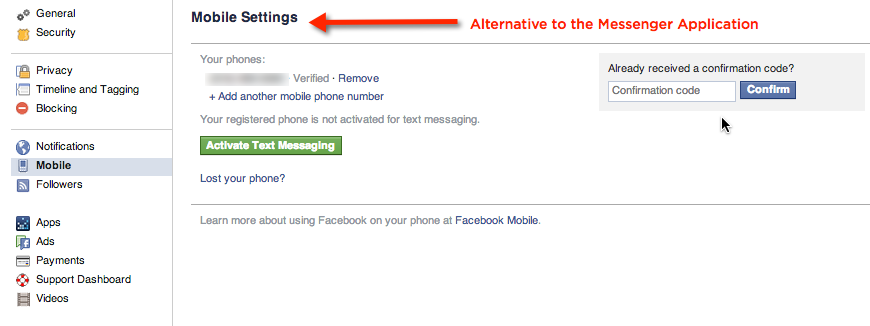
If you would like an alternative, try Facebook Texting:
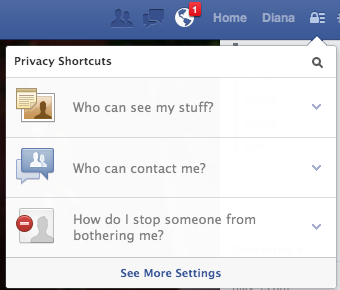
It is accessible via Facebook Settings (easiest way to access it is to click on the lock in the header next to the updates icon and go to “See more settings”).
Last week several news organizations including Ars Technica shared information about Facebook’s new passive listening feature.
From their report:
“Facebook has added a new feature to its mobile app as of Wednesday that uses a phone’s microphone to identify ambient TV shows, music, or movies and include them in status updates. The feature is off by default, though the app offers to turn it on in an intro screen that it pops up for users.”
This means if you use Facebook on your mobile device, you should take notice in the coming weeks and choose NOT to use this feature if you are not comfortable with it. Many of us are used to just bypassing these sorts of pop ups without a second thought. This is one you may want to pay attention to before you agree to it.
Do you have or know someone who has an iPhone or iPad? If you or they live in either Australia or the UK, here’s a heads up. Make sure your device has a 4 digit passcode and back up your data to your computer. Secondly, enable multifactor authentication. Otherwise, you may end up losing it to a hacker who has hijacked your iCloud account.
How often do you use your email? Your Twitter / Facebook / other social media accounts? Your cloud apps? What would you do if you lost it all? What is recovering it worth to you?
When we have something of value, it becomes a target. And, the more we entwine our lives with technology, the more valuable those 1s and 0s become to us.
Though cyber extortion is not new, it is interesting how common it is becoming.
The latest attempt I recently read involved the loss of the @N twitter handle, which was facilitated by both PayPal and GoDaddy.
Then there is the case of Hunter Moore who was arrested and indicted by the FBI for his involvement in hacking private email accounts to gain access to explicit pictures that were meant for private use only. While this was not exactly extortion, it was a method of hacking and stealing of personal digital property that was used to shame and make money off of unsuspecting people.
Last year the story making the rounds was about Cryptolocker hijacking people’s data and then requiring money to unlock it and regain access to it.
This is by no means an exhaustive list, rather just one to show the different ways your data can be used against you.
What does this all mean for you? It should heighten your awareness of cyber security and the very real threats that exist out there today. How do we mitigate these threats? We do what we can to protect our data. Following is a simple list of steps you can take immediately to avoid becoming a victim.
Back up your data
This means not only data you physically have access to like your financial documents, family photos/videos, or your music – but also your online presence. Many social networks let you download the entire contents of your user profile. You should also consider redundant backup options such as physical backups and off site backups. Just remember to make sure both are secure.
Use 2-Factor Authentication
Facebook, Gmail, Twitter, Paypal and more utilize 2-factor authentication. My first introduction to this was using an authenticator for my World of Warcraft account, which I opted for as soon as they were made available. I still use 2-factor on that account today. This Life Hacker article has a great rundown of all the places you should enable it. Do it now!
Hide Sensitive Information
While sites may require you to provide a birthday or email address, the also usually give you the ability to keep this information private. Those who need to know the year you were born or your private email address already have that information or can ask for it. There is no need for it to be out in the open for everyone to see. Also, don’t let sites save your credit card information. While it is an added convenience, as the case of @N above demonstrates, it can be used against you. Other advice he offered in his article was to call your institutions and require them to NOT share any of your personal information over the phone. That means birth dates, names, or partial information like last 4 of social or credit cards.
Be Wary of Strangers
This may sound odd as the whole allure of the internet is connecting with strangers. However, if you don’t know someone, you should be very cautious about letting them into any social network circle where they can find out more information about you as this can be used against you.
Be Careful Online
Don’t click on anything you can’t easily identify. Don’t submit information to sites you are not familiar with. Don’t trust things just because they come from people you know. Don’t download things to your computer without some sort of software protection installed.
In summary, treat your digital property much like you would treat your physical property. Follow the Hide Lock Take philosophy. It works for both your email and your car.
Being the 2-factor security person that I am, I know many of you have probably read about Facebook, GMail, and Twitter passwords being hacked. Though you can’t do much about that (other than not have accounts with those services of course), there are steps you can take to keep those accounts secure even if someone else has your password. All that is required is that you have a mobile phone and that you set it up from your computer (I don’t know of a way to do this from the mobile side only).
Facebook:
Facebook users, to enable the 2-factor setting click on the lock icon and click on the link at the bottom that says “See more settings”.
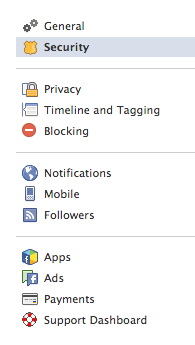
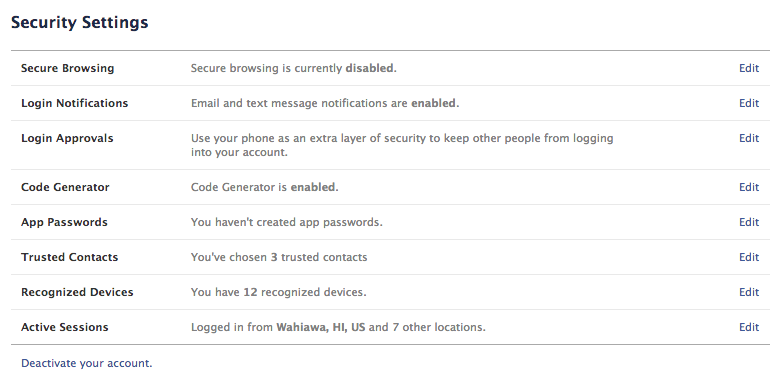
Once there, click on the Security link 2nd from the top on the left.
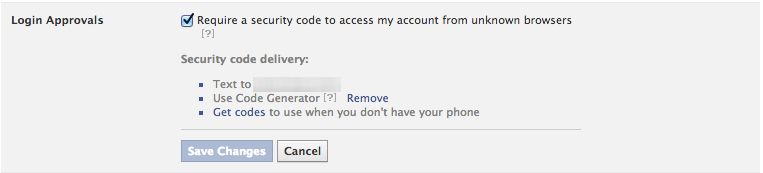
Then click on Login Approvals.
There you will be given a checkbox to “Require a security code to access my account from unknown browsers”.
You can check that box and then choose which method you use to get your codes. I chose the code generator because that will work even if I only have access to WiFi, whereas receiving a text message may not. I would also at this time generate extra codes just in case you lose your phone. Save them in a place that will be easy to access, so you can get back to your account easily should you need to.
While you’re in the security section I would also suggest you check the active sessions and recognized devices. End activity on anything you don’t recognize. Lastly, setup your trusted contacts. Be sure to choose people who actually use Facebook regularly.
GMail:
GMail users who use their accounts on multiple devices may find this method a bit cumbersome, but it’s only cumbersome to setup. Once it’s done, you don’t have to make any changes unless you get a new device or wish to disable it.
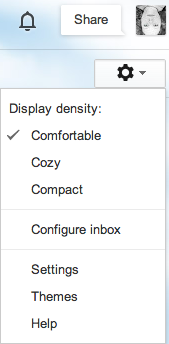
Login to your GMail account and then find the cog icon under your picture on the upper righthand side of your screen and click settings.
Once there, click Accounts at the top and you will find security settings.
Clicking Account Recovery Options lets you set up your phone to use to recover your account should you forget your password or to challenge hackers. You can also add a recover email address as well as an alternate email address you can log in with. I would highly suggest doing both.
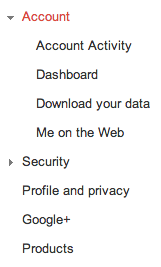
Clicking Other Google Account Settings will take you to a page that lists all of the settings for your Google identity. If you’ve never been here, I suggest you read it so that you understand more about the way Google views & uses your information. For our purposes today, click on Security from the menu on the left.
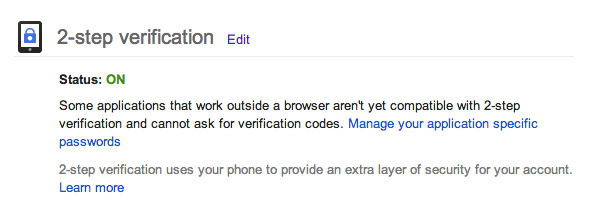
From there, scroll down to the bottom to find 2-Factor Authentication and turn it on.
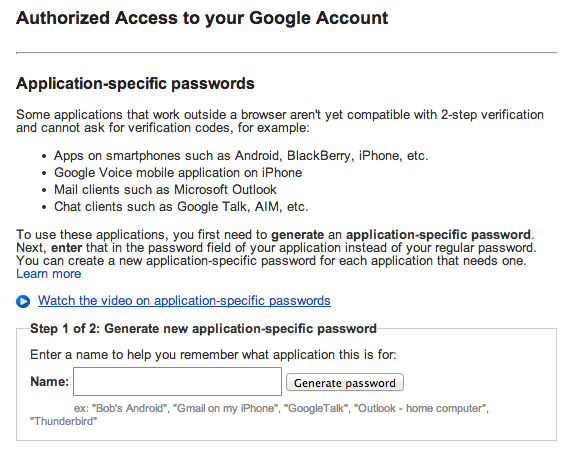
After you set it up, you will want to create device / application specific passwords for your account so that you can log into your email through your phone, tablet, or other device that doesn’t use 2-factor authentication. You can click on the link visible in the screen shot above to get there.
Pro-Tip, you can use one generated password for all of your devices if you enter it into all of them at the same time. Caution though, if you do that and have to revoke it for some reason (you lose your phone), you’ll end up revoking it for all devices instead of just that one.
Twitter:
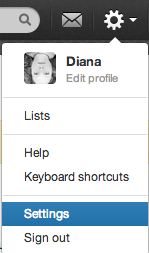
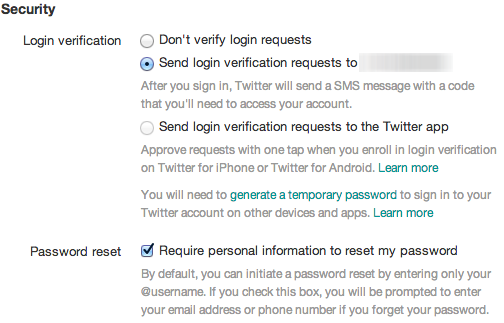
Login to Twitter and click the cog icon on the top right hand side of the nav bar.
Then select settings from the menu.
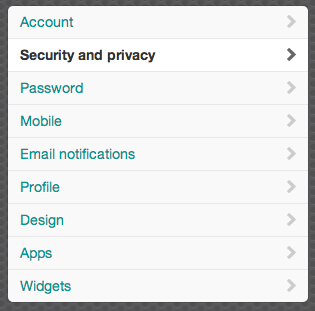
Then select Security and Privacy from the menu on the left.
Then select one of the two login verification options available.
Hopefully this was helpful to some of you. I know these settings can seem buried and intimidating if you’ve never used them before, but I suggest it is worth it to go through all of this trouble so that you don’t end up losing your digital life to someone else’s malicious activities.